
Oled kunagi imestanud how magnetic discs work—and why they’re the backbone of modern data storage? If you’re curious about the science behind hard disk drives, the role of magnetiliste domaanideks, or what makes a platter spin and save your files, you’re in the right place. In this guide, you’ll unlock the secrets of magnetic storage principles, discover how tiny ferromagnetic coatings hold billions of bits, and see why magnetism still powers everything from laptops to global data centers. Whether you’re a student, tech enthusiast, or engineer, get ready for clear answers and practical insights—plus expert tips from NBAEM, China’s trusted supplier of high-quality magnetilised materjalid. Let’s dive straight into the hidden world of magnetic discs!
What Are Magnetic Discs Defining the Basics
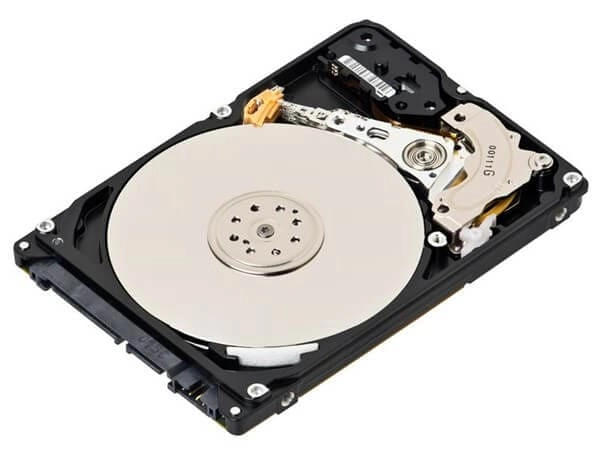
magnetic discs
Ever wondered how your computer stores photos, documents, and games? Magnetic discs are the answer. They’re the backbone of secondary storage in most computers, using clever science to keep your data safe and ready whenever you need it.
What Is a Magnetic Disc
A magnetic disc is a type of secondary storage device. It uses round platters coated with ferromagnetilised materjalid—think iron oxide or other alloys. These platters spin at high speeds while a tiny read-write head hovers above them, flipping magnetic domains to store your files as 1s and 0s. It’s like a high-tech record player, but for data.
How Magnetic Discs Evolved
The story starts in 1956 with IBM’s RAMAC—the first hard disk drive. It was the size of a fridge and could store just a few megabytes. Fast forward to today: hard disk drives (HDDs) fit in your hand and can hold terabytes of data. Floppy disks were once popular for moving files around, but they only held a few megabytes and are now mostly history.
- Hard disks: Big capacity, fast speeds, built for long-term storage
- Floppy disks: Portable, small capacity, mostly used in the past
Why Magnetic Discs Matter
Here’s why magnetic discs are still a top pick for storage:
- Affordable high capacity: You get tons of space for your money compared to other options
- Reliable: They keep data safe even when the power’s off (cURL Too many subrequests by single Worker invocation. To configure this limit, refer to https://developers.cloudflare.com/workers/wrangler/configuration/#limits)
- cURL Too many subrequests by single Worker invocation. To configure this limit, refer to https://developers.cloudflare.com/workers/wrangler/configuration/#limits cURL Too many subrequests by single Worker invocation. To configure this limit, refer to https://developers.cloudflare.com/workers/wrangler/configuration/#limits
cURL Too many subrequests by single Worker invocation. To configure this limit, refer to https://developers.cloudflare.com/workers/wrangler/configuration/#limits cURL Too many subrequests by single Worker invocation. To configure this limit, refer to https://developers.cloudflare.com/workers/wrangler/configuration/#limits ja magnetic storage principles cURL Too many subrequests by single Worker invocation. To configure this limit, refer to https://developers.cloudflare.com/workers/wrangler/configuration/#limits
cURL Too many subrequests by single Worker invocation. To configure this limit, refer to https://developers.cloudflare.com/workers/wrangler/configuration/#limits

cURL Too many subrequests by single Worker invocation. To configure this limit, refer to https://developers.cloudflare.com/workers/wrangler/configuration/#limits
- cURL Too many subrequests by single Worker invocation. To configure this limit, refer to https://developers.cloudflare.com/workers/wrangler/configuration/#limits cURL Too many subrequests by single Worker invocation. To configure this limit, refer to https://developers.cloudflare.com/workers/wrangler/configuration/#limits
- cURL Too many subrequests by single Worker invocation. To configure this limit, refer to https://developers.cloudflare.com/workers/wrangler/configuration/#limits cURL Too many subrequests by single Worker invocation. To configure this limit, refer to https://developers.cloudflare.com/workers/wrangler/configuration/#limits
- cURL Too many subrequests by single Worker invocation. To configure this limit, refer to https://developers.cloudflare.com/workers/wrangler/configuration/#limits cURL Too many subrequests by single Worker invocation. To configure this limit, refer to https://developers.cloudflare.com/workers/wrangler/configuration/#limits
- cURL Too many subrequests by single Worker invocation. To configure this limit, refer to https://developers.cloudflare.com/workers/wrangler/configuration/#limits cURL Too many subrequests by single Worker invocation. To configure this limit, refer to https://developers.cloudflare.com/workers/wrangler/configuration/#limits
- cURL Too many subrequests by single Worker invocation. To configure this limit, refer to https://developers.cloudflare.com/workers/wrangler/configuration/#limits cURL Too many subrequests by single Worker invocation. To configure this limit, refer to https://developers.cloudflare.com/workers/wrangler/configuration/#limits
cURL Too many subrequests by single Worker invocation. To configure this limit, refer to https://developers.cloudflare.com/workers/wrangler/configuration/#limits
- cURL Too many subrequests by single Worker invocation. To configure this limit, refer to https://developers.cloudflare.com/workers/wrangler/configuration/#limits
- cURL Too many subrequests by single Worker invocation. To configure this limit, refer to https://developers.cloudflare.com/workers/wrangler/configuration/#limits
- cURL Too many subrequests by single Worker invocation. To configure this limit, refer to https://developers.cloudflare.com/workers/wrangler/configuration/#limits
cURL Too many subrequests by single Worker invocation. To configure this limit, refer to https://developers.cloudflare.com/workers/wrangler/configuration/#limits
cURL Too many subrequests by single Worker invocation. To configure this limit, refer to https://developers.cloudflare.com/workers/wrangler/configuration/#limits
cURL Too many subrequests by single Worker invocation. To configure this limit, refer to https://developers.cloudflare.com/workers/wrangler/configuration/#limits
cURL Too many subrequests by single Worker invocation. To configure this limit, refer to https://developers.cloudflare.com/workers/wrangler/configuration/#limits
- Platters: These are flat, round discs stacked inside the drive. Each platter is coated with a thin layer of ferromagnetic material—usually iron oxide or similar alloys.
- Layers: Platters have multiple layers for durability, including the magnetic coating and protective surfaces.
- Multi-Platter Stacks: Most modern hard disks use several platters stacked together. More platters mean more storage space.
Read Write Head Technology
- Read-Write Heads: These tiny devices float just above the surface of each platter. The heads use electromagnetic induction to write data by changing the magnetization of the disk surface, and read data by sensing magnetic flux changes.
- Head Precision: Heads move with incredible accuracy, thanks to advanced control systems.
Actuator Arm and Spindle Motor
- Actuator Arm: This part moves the read-write heads across the platters. It’s fast and precise, letting the heads reach any part of the disk quickly.
- Spindle Motor: This motor spins the platters at high speed—commonly 5,400 or 7,200 revolutions per minute (RPM) in consumer drives. Faster spins mean quicker access to data.
Track and Sector Organization
- Tracks: Data is stored in concentric circles called tracks on each platter.
- Sectors: Each track is divided into sectors, which are the smallest units of storage for files.
- Cylinders: A cylinder is a group of tracks stacked vertically across all platters, making it easier for the heads to access related data quickly.
- Data Units: Organization into tracks, sectors, and cylinders helps the HDD manage files efficiently and keeps access times low.
Kokkuvõte: The mechanics inside a magnetic disc drive—platters, heads, motors, and smart data layout—are what let these drives deliver reliable, high-capacity secondary storage at a price that works for everyday US customers.
How Magnetic Discs Read and Write Data Step by Step
Let’s break down how magnetic discs actually handle your data. Whether it’s a hard disk drive (HDD) in your desktop or a legacy floppy, the way they read and write is pretty similar, just with different levels of tech.
Initialization and Head Calibration
- When you power up your computer, the disc spins up and the read-write heads calibrate.
- The actuator arm moves the heads to a “home” position, making sure everything lines up with the platters.
- This step is crucial for accurate data access and prevents damage to the ferromagnetic platter coating.
Writing Data Domain Alignment and Error Correction
- To write data, the head generates a magnetic field that flips tiny regions called magnetic domains on the platter.
- Each domain represents a bit—either a 0 or 1—using data domains polarization.
- cURL Too many subrequests by single Worker invocation. To configure this limit, refer to https://developers.cloudflare.com/workers/wrangler/configuration/#limits
cURL Too many subrequests by single Worker invocation. To configure this limit, refer to https://developers.cloudflare.com/workers/wrangler/configuration/#limits
- cURL Too many subrequests by single Worker invocation. To configure this limit, refer to https://developers.cloudflare.com/workers/wrangler/configuration/#limits
- cURL Too many subrequests by single Worker invocation. To configure this limit, refer to https://developers.cloudflare.com/workers/wrangler/configuration/#limits
- cURL Too many subrequests by single Worker invocation. To configure this limit, refer to https://developers.cloudflare.com/workers/wrangler/configuration/#limits
cURL Too many subrequests by single Worker invocation. To configure this limit, refer to https://developers.cloudflare.com/workers/wrangler/configuration/#limits
- cURL Too many subrequests by single Worker invocation. To configure this limit, refer to https://developers.cloudflare.com/workers/wrangler/configuration/#limits cURL Too many subrequests by single Worker invocation. To configure this limit, refer to https://developers.cloudflare.com/workers/wrangler/configuration/#limits
- cURL Too many subrequests by single Worker invocation. To configure this limit, refer to https://developers.cloudflare.com/workers/wrangler/configuration/#limits cURL Too many subrequests by single Worker invocation. To configure this limit, refer to https://developers.cloudflare.com/workers/wrangler/configuration/#limits
- cURL Too many subrequests by single Worker invocation. To configure this limit, refer to https://developers.cloudflare.com/workers/wrangler/configuration/#limits
cURL Too many subrequests by single Worker invocation. To configure this limit, refer to https://developers.cloudflare.com/workers/wrangler/configuration/#limits
- cURL Too many subrequests by single Worker invocation. To configure this limit, refer to https://developers.cloudflare.com/workers/wrangler/configuration/#limits cURL Too many subrequests by single Worker invocation. To configure this limit, refer to https://developers.cloudflare.com/workers/wrangler/configuration/#limits
- cURL Too many subrequests by single Worker invocation. To configure this limit, refer to https://developers.cloudflare.com/workers/wrangler/configuration/#limits cURL Too many subrequests by single Worker invocation. To configure this limit, refer to https://developers.cloudflare.com/workers/wrangler/configuration/#limits
- cURL Too many subrequests by single Worker invocation. To configure this limit, refer to https://developers.cloudflare.com/workers/wrangler/configuration/#limits
cURL Too many subrequests by single Worker invocation. To configure this limit, refer to https://developers.cloudflare.com/workers/wrangler/configuration/#limits cURL Too many subrequests by single Worker invocation. To configure this limit, refer to https://developers.cloudflare.com/workers/wrangler/configuration/#limits cURL Too many subrequests by single Worker invocation. To configure this limit, refer to https://developers.cloudflare.com/workers/wrangler/configuration/#limits
cURL Too many subrequests by single Worker invocation. To configure this limit, refer to https://developers.cloudflare.com/workers/wrangler/configuration/#limits
cURL Too many subrequests by single Worker invocation. To configure this limit, refer to https://developers.cloudflare.com/workers/wrangler/configuration/#limits
cURL Too many subrequests by single Worker invocation. To configure this limit, refer to https://developers.cloudflare.com/workers/wrangler/configuration/#limits
cURL Too many subrequests by single Worker invocation. To configure this limit, refer to https://developers.cloudflare.com/workers/wrangler/configuration/#limits
Eelised:
- cURL Too many subrequests by single Worker invocation. To configure this limit, refer to https://developers.cloudflare.com/workers/wrangler/configuration/#limits Magnetic discs offer a lot of space for your dollar. This makes them perfect for storing tons of files, photos, and videos without breaking the bank.
- High capacity: Modern HDDs can store terabytes of data, making them a top pick for both home users and big businesses.
- Non-volatile: Data stays put even when the power’s off, so you don’t lose files unexpectedly.
- Widely compatible: Most computers and servers can use magnetic discs, so they’re a safe choice for upgrades and backups.
Where Magnetic Discs Fall Short
There are a few things to keep in mind if you’re considering magnetic disc storage:
- Mechanical wear: Since these drives have moving parts (like spinning platters and actuator arms), they can wear out over time.
- Speed: Magnetic discs are slower than solid-state drives (SSDs) when it comes to reading and writing data.
- Vulnerability: They’re sensitive to drops, shocks, and even strong magnets. Physical damage or magnetic fields can cause data loss.
How Magnetic Discs Are Used Today
Magnetic discs are everywhere, especially in the United States where large-scale data storage is a must:
- Data centers: They power cloud storage, streaming services, and enterprise backups thanks to their low cost and high capacity.
- Personal computers: Many desktops and some laptops still use HDDs for storing big files, games, and media libraries.
- Hybrid systems: Some setups combine SSDs (for speed) and HDDs (for capacity), giving users the best of both worlds.
What’s Next for Magnetic Disc Technology
Innovation hasn’t stopped. Here’s what’s on the horizon:
- HAMR (Heat-Assisted Magnetic Recording): This tech uses lasers to heat up the disc surface, letting drives store even more data in the same space.
- Sustainable materials: Researchers are working on eco-friendly coatings and processes for magnetic discs. If you’re curious about the latest in magnetic material research, check out recent advances in magnetic material research.
- Better durability: Future drives may use advanced materials to resist wear and damage, making them last longer in tough environments.
For more on how magnetic materials are shaping new tech, see our guide to tüsistuste magnetilise materjali tootmise jätkusuutlikkus.
Kokkuvõte: Magnetic discs remain a cost-effective, high-capacity storage solution for both personal and business needs in the US, even as new technologies push the boundaries of what’s possible.


 Estonian
  English
  German
  Vietnamese
  Spanish (Mexico)
  Russian
  Turkish
  Polish
  Hindi
Hindi  Thai
Thai  Malay
Malay  Korean
  Japanese
  French
  Czech
Czech  Danish
  Dutch
Dutch  Finnish
  Italian
  Portuguese (Brazil)
  Portuguese (Portugal)
  Slovenian
  Ukrainian
  Hebrew
  Scottish Gaelic
  Hungarian
  Tagalog
  Spanish (Spain)
  Serbian
  Indonesian
  Slovak
  Dutch (Belgium)
  Persian
  Arabic
  Romanian
  Greek
Greek  Bulgarian


Jäta kommentaar